| TL;DR Enterprise software usability failures aren’t taste problems. They’re debt the compounding cost of shortcuts taken during product decisions years earlier.The international standard is clear that usability is not a property of a product but an outcome of interaction in a specific context. Your feature list cannot be “usable.” Only the work can.Four debts cause most of the damage: org-chart navigation, day-one-only onboarding, configurability as an apology, and database-authored error messages.Every fix below is shippable by a designer or a developer. No redesign required. |
A finance team buys a new platform because it wins the feature comparison. Eighteen months later, that team runs a shadow spreadsheet beside it because the software can technically do everything, but nothing quickly.
No one logs a bug. The system works. It’s just exhausting.
That gap between functional and usable is now the sharpest competitive line in B2B software. That gap between functional and usable is now the sharpest competitive line in B2B software.
The stakes are simply large: US Bureau of Labor Statistics data shows full-time employed people work an average of 8.1 hours on days they work. For most knowledge workers, nearly all of that time is spent inside enterprise applications. A friction cost of even two minutes per task, repeated forty times a day, is not a design detail. It’s a staffing decision.
Here’s the useful reframe: usability problems behave exactly like technical debt. They have a traceable origin, they accrue interest, and they can be audited. So let’s audit.
Table of Contents
1. Debt #1: You Shipped Your Organization Chart as an Interface
2. Debt #2: You Designed for Day One and Forgot Day 400
3. Debt #3: Configurability as an Apology
4. Debt #4: Your Error Messages Were Written by the Database
5. The Audit Is the Practice
6. FAQs
Debt #1: You Shipped Your Organization Chart as an Interface
Open most enterprise applications and the top-level navigation maps neatly onto the company that built it, one section per internal team. Users don’t think in departments. They think in tasks: close the month, approve this claim, onboard this hire.
Every mismatch forces a translation step, and translation steps fragment attention. Landmark research from UC Irvine found that when knowledge workers were pulled away from a task, they returned to it after an average of 23 minutes and 15 seconds, typically passing through about two intervening tasks first. Bad navigation manufactures exactly that kind of detour internally, dozens of times a day.
| The fix: Restructure information architecture around verbs, not owners. Run a card sort with actual users and name the top-level nav after the five tasks they perform most. If a label matches a team name, it’s probably wrong. |
Debt #2: You Designed for Day One and Forgot Day 400
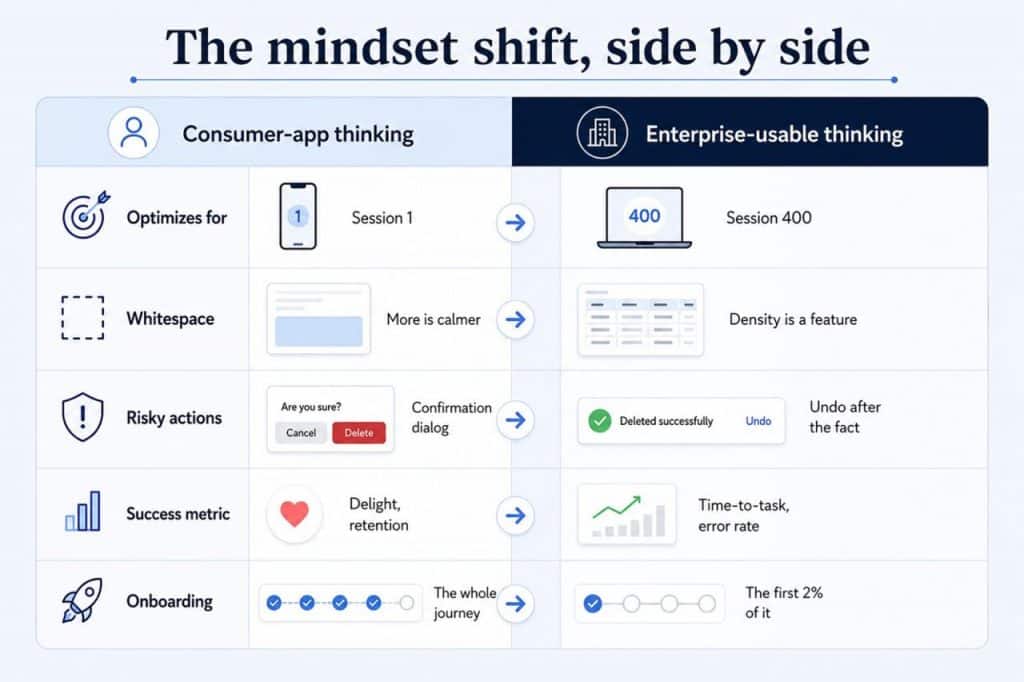
Consumer UX advice dominates the internet, and it optimizes for a user who might leave in thirty seconds. Enterprise users don’t leave. They stay for six hours a day, for years.
The usability standard itself makes this distinction explicit. ISO 9241-11 lists regular ongoing use, learning, and infrequent use as separate design objectives, each requiring different decisions. Most enterprise products optimize only for the second and then wonder why power users route around them. Wizards and hand-holding modals are wonderful in week one and a tax forever after.
| The fix: Progressive disclosure with escape hatches. Guide beginners, but ship keyboard shortcuts, bulk actions, saved views, and URL-addressable states from day one so expertise has somewhere to go. |
Debt #3: Configurability as an Apology
Two hundred settings in a preferences panel is rarely generosity. It’s usually an unmade decision nobody could agree on a default, so the choice got pushed to the customer.
The research on adoption suggests why this backfires. Davis’s foundational work on technology acceptance found that perceived usefulness correlated with system usage at r = .63 and r = .85 across two studies, consistently outweighing perceived ease of use. Translation: users forgive a learning curve, but they abandon software they can’t see the point of. A wall of undifferentiated settings obscures the point.
| The fix: Opinionated defaults, scoped configuration. Make the strongest defensible default choice for the most common role, then expose configuration by role rather than globally. Settings nobody has changed in twelve months are candidates for deletion, not documentation. |
Are you building or rebuilding an internal platform?
See how our Product Design team scopes enterprise UX →
Debt #4: Your Error Messages Were Written by the Database
Error: constraint violation on field_id_7734.
Someone shipped that. Not maliciously; it just fell through the crack between design (who never saw it) and engineering (who considered it handled). Error states are where usability quietly becomes a code-level concern, which is exactly why they’re the highest-leverage fix on this list.
The accessibility standards have made this explicit. WCAG 2.2 requires that when an input error is detected, users receive suggestions for correcting it, not merely notification that something broke. The same standard’s rules on reducing repeated input and accessible authentication target the exact friction that legacy enterprise systems accumulate most.
| The fix: Write errors that name the remedy, not the fault. “Add a cost center before submitting [choose one]” beats any constraint name. Add this to your pull-request checklist, and it costs your team almost nothing. |
The Audit Is the Practice
None of this requires a redesign. Redesigns are how usability debt gets reset, not repaid, and they routinely break the expert workflows described in Debt #2.
Treat it instead as a quarterly review. Pick one debt. Find three places it appears. Ship the fix. Measure time-to-task before and after. The teams pulling ahead in 2026 aren’t the ones with the prettiest interfaces; they’re the ones who stopped letting usability decisions accumulate silently.
FAQs
1. What is usability debt in enterprise software?
Usability debt is the accumulated cost of past product decisions that make software harder to use over time, such as navigation built around internal teams, or error messages surfaced straight from the database. Like technical debt, it compounds and can be audited.
2. Why is enterprise software usability a competitive differentiator in 2026?
Because switching costs have fallen. Cloud-native and API-first platforms make migration realistic, so employee frustration now converts into churn rather than resignation.
3. How is enterprise UX different from consumer UX?
Consumer UX optimizes for first-time discovery. Enterprise UX optimizes for repeated expert use: speed, accuracy, and low cognitive load across years of daily work.
4. What’s the fastest usability fix for a development team?
Rewriting error messages to state the correction rather than the failure. It’s a code-level change requiring no redesign, and it aligns with WCAG 2.2 Error Suggestion.